Apex Triggers — Complete Guide
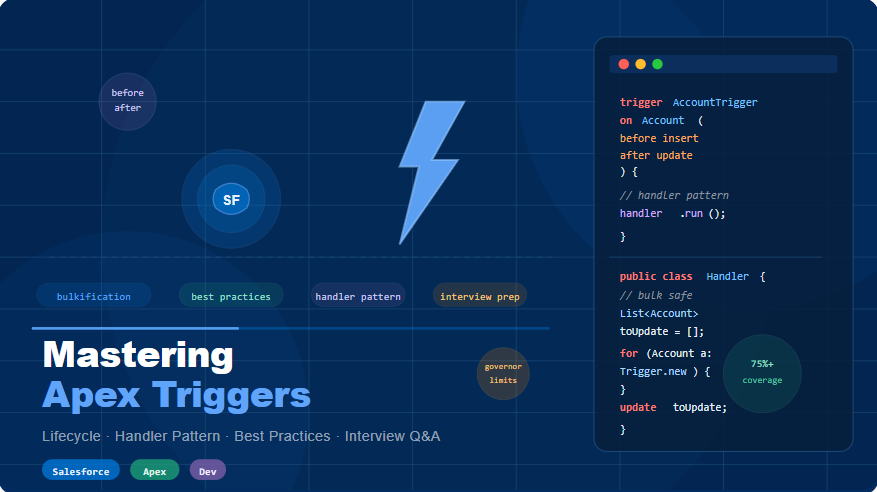
Full syntax, lifecycle, handler pattern, best practices, interview Q&A, and 4 scenario-based coding solutions — all with complete, copy-ready code.
Apex code that executes automatically before or after specific DML events on a Salesforce object (insert, update, delete, undelete). The trigger file should be thin — all logic goes into a handler class.
Trigger.new directly — no extra DML needed. Record is not yet committed. Perfect for defaulting fields and validations.Id and system fields are now available. Trigger.new is read-only here. Use to create or update related records./** * AccountTrigger.trigger * One trigger per object. All logic delegates to handler. * Supports: before insert, before update, after insert, * after update, after delete, after undelete */ trigger AccountTrigger on Account ( before insert, before update, before delete, after insert, after update, after delete, after undelete ) { // Bypass mechanism — useful for data migrations if (TriggerBypassHandler.isBypassed('AccountTrigger')) { return; } // Instantiate handler — no logic here in the trigger file AccountTriggerHandler handler = new AccountTriggerHandler(); if (Trigger.isBefore) { if (Trigger.isInsert) { handler.onBeforeInsert(Trigger.new); } if (Trigger.isUpdate) { handler.onBeforeUpdate(Trigger.new, Trigger.newMap, Trigger.oldMap); } if (Trigger.isDelete) { handler.onBeforeDelete(Trigger.old, Trigger.oldMap); } } if (Trigger.isAfter) { if (Trigger.isInsert) { handler.onAfterInsert(Trigger.new, Trigger.newMap); } if (Trigger.isUpdate) { handler.onAfterUpdate(Trigger.new, Trigger.newMap, Trigger.oldMap); } if (Trigger.isDelete) { handler.onAfterDelete(Trigger.old, Trigger.oldMap); } if (Trigger.isUndelete) { handler.onAfterUndelete(Trigger.new, Trigger.newMap); } } }
Every trigger execution exposes context variables via the Trigger namespace. Knowing which variables are available per event is a very common interview question.
| Event | Before | After | Trigger.new | Trigger.old | newMap / oldMap |
|---|---|---|---|---|---|
| insert | Yes | Yes | New recs | null | newMap after only |
| update | Yes | Yes | Updated recs | Old values | Both available |
| delete | Yes | Yes | null | Deleted recs | oldMap both contexts |
| undelete | No | Yes | Restored recs | null | newMap after only |
| merge | Yes | Yes | Winner record | Losing recs | Both available |
| upsert | Yes | Yes | New or updated | Old (if update) | Depends on insert/update |
// ─── Boolean context flags ────────────────────────────────────
Trigger.isBefore      // true when executing a before trigger
Trigger.isAfter       // true when executing an after trigger
Trigger.isInsert      // true on insert event
Trigger.isUpdate      // true on update event
Trigger.isDelete      // true on delete event
Trigger.isUndelete    // true on undelete event
Trigger.isExecuting   // true if the current context is a trigger

// ─── Record collections ───────────────────────────────────────
// Trigger.new → List<SObject>
// Writable in BEFORE triggers only. Read-only in AFTER triggers.
List<Account> newAccounts = Trigger.new;

// Trigger.old → List<SObject>  (update, delete only)
List<Account> oldAccounts = Trigger.old;

// Trigger.newMap → Map<Id, SObject>  (after insert, before/after update)
Map<Id, Account> newMap = Trigger.newMap;

// Trigger.oldMap → Map<Id, SObject>  (before/after update, before/after delete)
Map<Id, Account> oldMap = Trigger.oldMap;

// ─── Size ────────────────────────────────────────────────────
Integer count = Trigger.size; // total records in this trigger invocation

// ─── Field change detection pattern (update only) ────────────
for (Account acc : Trigger.new) {
    Account oldAcc = Trigger.oldMap.get(acc.Id);
    if (acc.Rating != oldAcc.Rating) {
        // Rating was changed on this record — take action
    }
    if (acc.OwnerId != oldAcc.OwnerId) {
        // Ownership transferred
    }
}
Industry standard: the trigger file contains only routing. All business logic lives in a handler class. This enables unit testing, maintainability, and a bypass mechanism.
/**
 * AccountTriggerHandler.cls
 * Handles all Account trigger events.
 * Never call DML or SOQL at class level — only inside methods.
 */
public class AccountTriggerHandler {

    // ──────── BEFORE INSERT ─────────────────────────────────────
    public void onBeforeInsert(List<Account> newAccounts) {
        AccountService.setDefaultValues(newAccounts);
        AccountService.validateRequiredFields(newAccounts);
    }

    // ──────── BEFORE UPDATE ─────────────────────────────────────
    public void onBeforeUpdate(
        List<Account> newAccounts,
        Map<Id, Account> newMap,
        Map<Id, Account> oldMap
    ) {
        AccountService.detectFieldChanges(newAccounts, oldMap);
    }

    // ──────── BEFORE DELETE ─────────────────────────────────────
    public void onBeforeDelete(
        List<Account> oldAccounts,
        Map<Id, Account> oldMap
    ) {
        AccountService.preventDeleteIfHasOpportunities(oldAccounts);
    }

    // ──────── AFTER INSERT ──────────────────────────────────────
    public void onAfterInsert(
        List<Account> newAccounts,
        Map<Id, Account> newMap
    ) {
        AccountService.createDefaultContacts(newAccounts);
        AccountService.sendWelcomeNotification(newAccounts);
    }

    // ──────── AFTER UPDATE ──────────────────────────────────────
    public void onAfterUpdate(
        List<Account> newAccounts,
        Map<Id, Account> newMap,
        Map<Id, Account> oldMap
    ) {
        AccountService.syncRelatedContacts(newAccounts, oldMap);
    }

    // ──────── AFTER DELETE ──────────────────────────────────────
    public void onAfterDelete(
        List<Account> oldAccounts,
        Map<Id, Account> oldMap
    ) {
        AccountService.cleanupOrphanedRecords(oldAccounts);
    }

    // ──────── AFTER UNDELETE ────────────────────────────────────
    public void onAfterUndelete(
        List<Account> restoredAccounts,
        Map<Id, Account> restoredMap
    ) {
        AccountService.reactivateRelatedData(restoredAccounts);
    }
}
/**
 * TriggerBypassHandler.cls
 * Uses Custom Metadata (Trigger_Bypass__mdt) to disable
 * specific triggers during data migrations or integrations.
 * No code deployment needed — just activate the record.
 */
public class TriggerBypassHandler {

    // Cache the metadata query result for this transaction
    private static Map<String, Trigger_Bypass__mdt> bypassMap;

    static {
        bypassMap = new Map<String, Trigger_Bypass__mdt>();
        for (Trigger_Bypass__mdt rec : [
            SELECT DeveloperName, Is_Active__c
            FROM Trigger_Bypass__mdt
            WHERE Is_Active__c = true
        ]) {
            bypassMap.put(rec.DeveloperName, rec);
        }
    }

    /**
     * Returns true if this trigger should be skipped.
     * @param triggerName  API name of the trigger, e.g. 'AccountTrigger'
     */
    public static Boolean isBypassed(String triggerName) {
        return bypassMap.containsKey(triggerName);
    }
}
These rules separate senior developers from juniors. Every one of them maps to a real governor limit or a production incident.
for (Account a : Trigger.new) {
  // SOQL inside loop — 101 queries!
  List<Contact> cons = [
    SELECT Id FROM Contact
    WHERE AccountId = :a.Id
  ];
  for (Contact c : cons) {
    c.Title = 'Updated';
  }
  // DML inside loop — 201 DML!
  update cons;
}
Set<Id> ids = new Set<Id>();
for (Account a : Trigger.new) {
  ids.add(a.Id); // collect
}
// 1 SOQL — outside loop
List<Contact> cons = [
  SELECT Id FROM Contact
  WHERE AccountId IN :ids
];
for (Contact c : cons) {
  c.Title = 'Updated';
}
update cons; // 1 DML
/**
 * TriggerRecursionGuard.cls
 * Prevents the same record from being processed twice
 * within one transaction — handles bulk correctly.
 */
public class TriggerRecursionGuard {

    // Static — lives for the duration of the transaction
    private static Map<String, Set<Id>> processedIds =
        new Map<String, Set<Id>>();

    /**
     * Returns only records that haven't been processed yet.
     * Records their IDs so they won't be processed again.
     *
     * @param context    Unique string, e.g. 'AccountTrigger.afterUpdate'
     * @param records    Trigger.new or Trigger.old
     */
    public static List<SObject> filterNew(
        String context,
        List<SObject> records
    ) {
        if (!processedIds.containsKey(context)) {
            processedIds.put(context, new Set<Id>());
        }
        Set<Id> seen = processedIds.get(context);
        List<SObject> fresh = new List<SObject>();

        for (SObject rec : records) {
            Id recId = (Id) rec.get('Id');
            if (!seen.contains(recId)) {
                fresh.add(rec);
                seen.add(recId);
            }
        }
        return fresh;
    }
}

// Usage in handler:
public void onAfterUpdate(List<Account> newAccounts, ...) {
    List<SObject> unprocessed = TriggerRecursionGuard.filterNew(
        'AccountTrigger.afterUpdate', newAccounts
    );
    if (unprocessed.isEmpty()) return;
    // ... process only unprocessed
}
public static void validateRequiredFields(List<Account> accounts) {
    for (Account acc : accounts) {

        // Field-level error — highlights the specific field in the UI
        if (String.isBlank(acc.Phone)) {
            acc.Phone.addError('Phone is required for all Account records.');
        }

        // Field-level error with i18n-friendly label reference
        if (acc.AnnualRevenue != null && acc.AnnualRevenue < 0) {
            acc.AnnualRevenue.addError('Annual Revenue cannot be negative.');
        }

        // Record-level error — shown at the top of the page layout
        if (acc.Type == null && acc.AnnualRevenue > 1000000) {
            acc.addError(
                'Account Type is required when Annual Revenue exceeds $1M.'
            );
        }
    }
}
Tap any question to reveal the full answer. Difficulty levels: Easy · Medium · Hard.
Real scenarios asked in Salesforce developer interviews. Expand each for the complete, production-ready solution.
Best of Luck
Trusted by 2000+ learners to crack interviews at TCS, Infosys, Wipro, EY, and more.
Want more Real Salesforce Interview Q&As?
- For Beginners (1–4 Yrs Experience) → https://trailheadtitanshub.com/100-real-salesforce-scenario-based-interview-questions-2025-edition-for-1-4-years-experience/
- For Intermediate Developers (4–8 Yrs Experience) → https://trailheadtitanshub.com/100-real-time-salesforce-scenario-based-interview-questions-2025-edition-for-4-8-years-experience/
For All Job Seekers – 500+ Questions from Top Tech Companies → https://trailheadtitanshub.com/500-real-interview-questions-answers-from-top-tech-companies-ey-infosys-tcs-dell-salesforce-more/
- Student Journey – 34 Days to Crack Salesforce Interview → https://trailheadtitanshub.com/crack-the-interview-real-questions-real-struggles-my-students-34-day-journey/
Mega Interview Packs:
- 600 Real Q&A (Recruiter Calls) → https://trailheadtitanshub.com/salesforce-interview-mega-pack-600-real-questions-from-recruiter-calls-with-my-best-performing-answers/
- 100 Real-Time Scenarios (Admin + Apex + LWC + Integration) → 100 Real-Time Salesforce Interview Questions & Scenarios (2026 Edition) – Admin, Apex, SOQL, LWC, VF, Integration – Trailhead Titans Hub
Career Boosters:
- Salesforce Project (Sales Cloud) → https://trailheadtitanshub.com/salesforce-project-sales-cloud/
- Resume Templates (ATS-Friendly) → https://trailheadtitanshub.com/salesforce-resume-templates-that-work-beat-ats-impress-recruiters/
Visit us On→ www.trailheadtitanshub.com