Complete Salesforce Lightning Web Components (LWC) Interview Guide
Lightning Web Components (LWC) is one of the most important topics in Salesforce developer interviews. Most companies now prefer LWC over Aura Components because it is faster, lightweight, modern, and based on web standards.
In interviews, candidates are often asked:
- Difference between
@wireand Imperative Apex - LDS vs Apex
- Parent-child communication
- Lifecycle hooks
- Event handling
- Reactive properties
- Component communication scenarios
Many candidates know the theory but struggle to explain practical implementation with real examples.
This blog explains every important LWC concept in detail with practical examples and interview-focused explanations.
1. @wire vs Imperative Apex in LWC
This is one of the most frequently asked Salesforce LWC interview questions.
Interviewers usually ask:
- What is
@wire? - When should we use imperative Apex?
- Difference between reactive and non-reactive calls?
- Which one is better?
- Can we call DML using
@wire?
Understanding @wire in LWC
@wire is used to fetch data reactively.
Reactive means:
Whenever the parameter value changes, Salesforce automatically calls the Apex method again.
Key Features of @wire
- Reactive
- Automatic data refresh
- Simpler syntax
- Mostly used for read operations
- Uses cacheable=true methods
- Best for displaying data
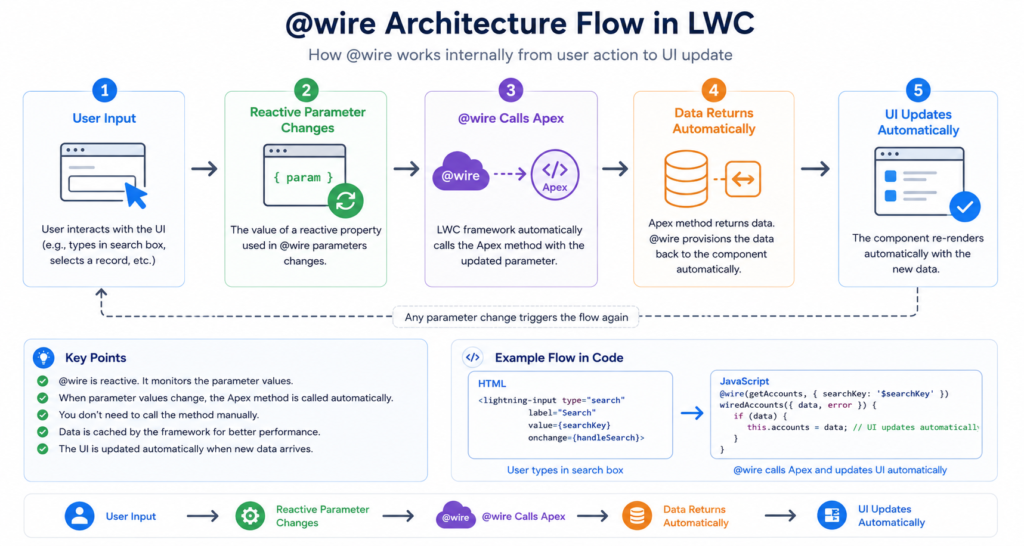
@wire Architecture Flow
Image:
User Input → Reactive Parameter Changes → @wire Calls Apex → Data Returns Automatically → UI Updates
Example: Using @wire in LWC
Apex Class
public with sharing class AccountController {

    @AuraEnabled(cacheable=true)
    public static List<Account> getAccounts(String searchKey) {
        return [
            SELECT Id, Name, Industry
            FROM Account
            WHERE Name LIKE :('%' + searchKey + '%')
            LIMIT 10
        ];
    }
}
LWC JavaScript
import { LightningElement, wire, track } from 'lwc';
import getAccounts from '@salesforce/apex/AccountController.getAccounts';

export default class WireExample extends LightningElement {

    @track searchKey = '';

    @wire(getAccounts, { searchKey: '$searchKey' })
    accounts;

    handleChange(event) {
        this.searchKey = event.target.value;
    }
}
LWC HTML
<template>
    <lightning-input
        label="Search Account"
        onchange={handleChange}>
    </lightning-input>

    <template if:true={accounts.data}>
        <template for:each={accounts.data} for:item="acc">
            <p key={acc.Id}>{acc.Name}</p>
        </template>
    </template>
</template>
Important Interview Points about @wire
1. cacheable=true is mandatory
Without cacheable=true, @wire will throw an error.
Reason:
@wire is designed for read-only operations.
2. Reactive Variables
{ searchKey: '$searchKey' }
The $ symbol makes the property reactive.
Whenever searchKey changes:
- Apex method executes again
- UI refreshes automatically
3. Cannot Perform DML Using @wire
You cannot:
- insert
- update
- delete
using @wire methods.
Because wired methods must be cacheable.
Understanding Imperative Apex
Imperative Apex means:
You manually call Apex whenever required.
Unlike @wire, it does not automatically execute when values change.
Key Features of Imperative Apex
- Manual execution
- Better control
- Used for DML operations
- Supports insert/update/delete
- Used for button click operations
- Used for complex logic
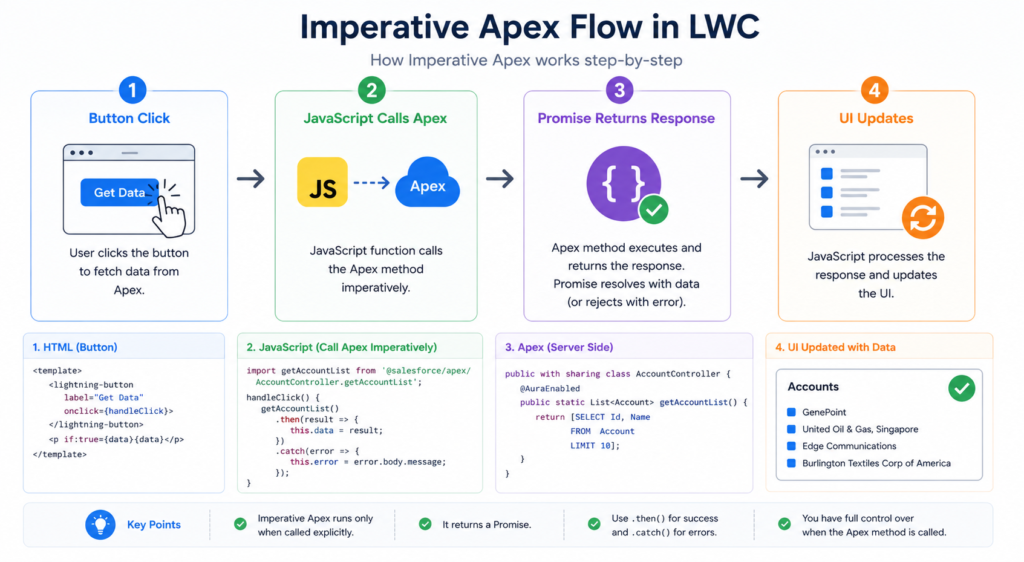
Imperative Apex Flow
Image:
Button Click → JavaScript Calls Apex → Promise Returns Response → UI Updates
Example: Imperative Apex
Apex Class
public with sharing class ContactController {

    @AuraEnabled
    public static List<Contact> getContacts(String accountId) {
        return [
            SELECT Id, Name, Email
            FROM Contact
            WHERE AccountId = :accountId
        ];
    }
}
LWC JavaScript
import { LightningElement, track } from 'lwc';
import getContacts from '@salesforce/apex/ContactController.getContacts';

export default class ImperativeExample extends LightningElement {

    @track contacts;

    handleLoad() {
        getContacts({ accountId: '001XXXXXXXXXXXX' })
            .then(result => {
                this.contacts = result;
            })
            .catch(error => {
                console.error(error);
            });
    }
}
Why Interviewers Prefer This Question
This question checks whether the candidate understands:
- Reactive programming
- Data handling
- Caching
- Performance optimization
- Best practices
@wire vs Imperative Apex Comparison Table
| Feature | @wire | Imperative Apex |
|---|---|---|
| Execution | Automatic | Manual |
| Reactive | Yes | No |
| cacheable=true Required | Yes | No |
| Supports DML | No | Yes |
| Better for Read Operations | Yes | Yes |
| Better Control | Limited | Full |
| Error Handling | Automatic + manual | Manual |
| Best Use Case | Display data | Button actions |
Interview Scenario Question
Question
“When would you use Imperative Apex over @wire?”
Best Answer
Use Imperative Apex when:
- We need DML operations
- We need better control over execution
- Data should not load automatically
- We need to call Apex on button click
- Complex business logic exists
2. LDS vs Apex in LWC
Another very important interview topic.
Interviewers ask:
- What is Lightning Data Service?
- Difference between LDS and Apex?
- Which one performs better?
- When should we avoid Apex?
What is Lightning Data Service (LDS)?
Lightning Data Service allows LWC components to work with Salesforce records without writing Apex.
Salesforce automatically handles:
- CRUD
- FLS
- Sharing
- Caching
- Security
LDS Architecture
Image:
LWC → Lightning Data Service → Salesforce Database
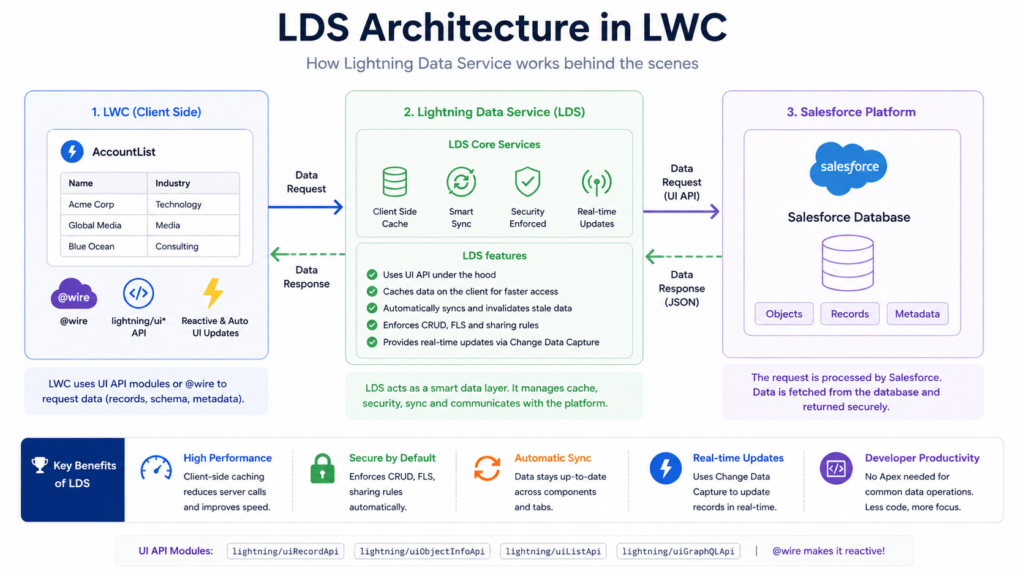
Mention:
- Security handled automatically
- No Apex needed
- Shared cache
Example: Using LDS
HTML
<template>
    <lightning-record-form
        record-id={recordId}
        object-api-name="Account"
        layout-type="Full"
        mode="view">
    </lightning-record-form>
</template>
JavaScript
import { LightningElement, api } from 'lwc';

export default class AccountRecord extends LightningElement {
    @api recordId;
}
Benefits of LDS
1. No Apex Required
Less code.
Less maintenance.
2. Automatic Security
LDS automatically enforces:
- CRUD
- Field-Level Security
- Sharing Rules
3. Better Performance
Uses shared cache.
If another component already loaded the same record:
Salesforce reuses cached data.
When to Use Apex Instead of LDS
Use Apex when:
- Complex SOQL is needed
- Multiple objects involved
- Aggregation required
- Custom business logic needed
- Large datasets involved
LDS vs Apex Comparison Table
| Feature | LDS | Apex |
|---|---|---|
| Requires Apex Code | No | Yes |
| Security Handled Automatically | Yes | Manual |
| Complex Queries | No | Yes |
| Performance | Excellent | Depends |
| Multi-object Queries | Limited | Yes |
| Best for Simple Forms | Yes | No |
Interview Tip
A strong developer always prefers:
- LDS first
- Apex only if required
Interviewers love hearing this.
3. Parent-Child Communication in LWC
This is one of the most practical LWC interview topics.
Interviewers ask:
- How do components communicate?
- Parent to child communication?
- Child to parent communication?
- Sibling communication?
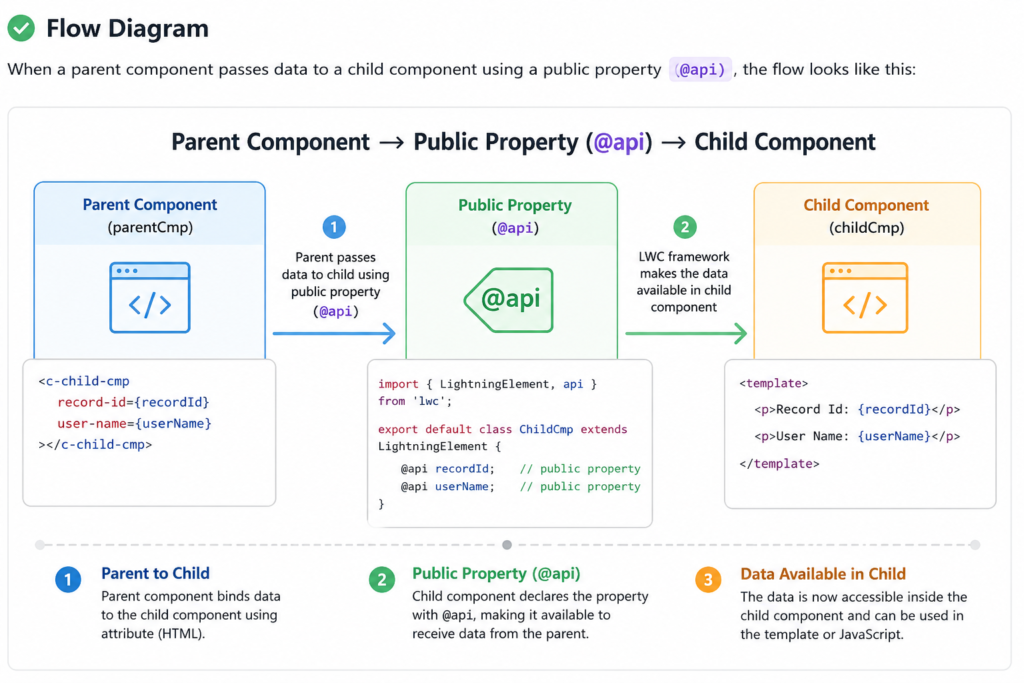
Parent to Child Communication
Parent passes data using:
@api
Flow Diagram
Image:
Parent Component → Public Property (@api) → Child Component
Example: Parent to Child
Child Component JS
import { LightningElement, api } from 'lwc';

export default class ChildComponent extends LightningElement {
    @api message;
}
Child HTML
<template>
    <p>{message}</p>
</template>
Parent HTML
<template>
    <c-child-component message="Hello from Parent">
    </c-child-component>
</template>
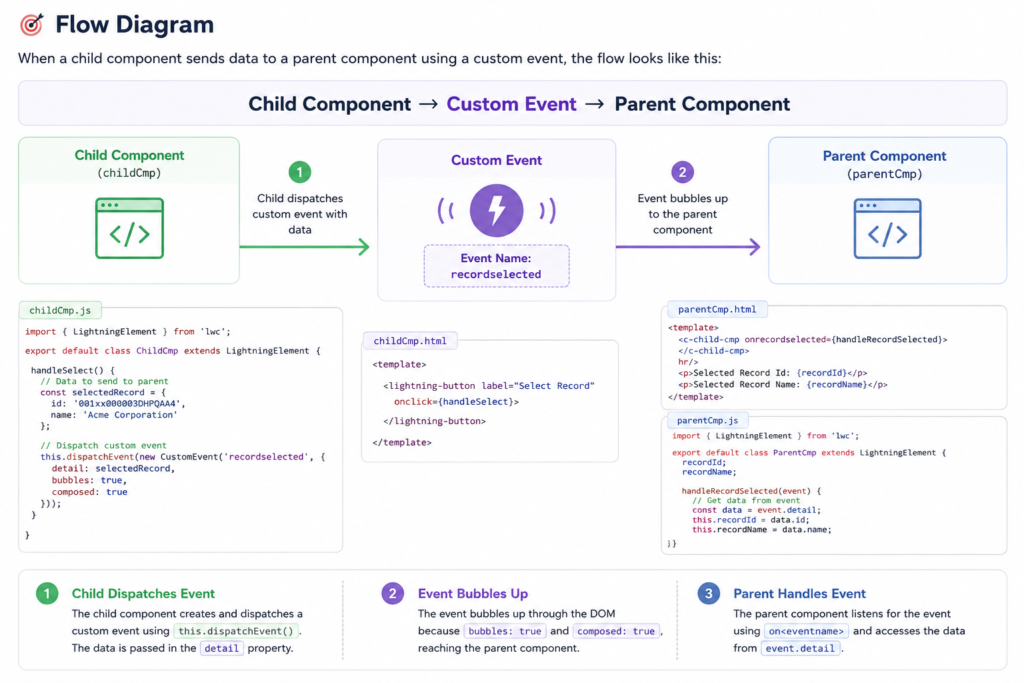
Child to Parent Communication
Child communicates using:
Custom Events
Flow Diagram
Image:
Child Component → Custom Event → Parent Component
Example: Child to Parent
Child JS
import { LightningElement } from 'lwc';

export default class ChildComponent extends LightningElement {

    sendData() {
        const event = new CustomEvent('save', {
            detail: 'Record Saved'
        });

        this.dispatchEvent(event);
    }
}
Child HTML
<template>
    <lightning-button
        label="Send"
        onclick={sendData}>
    </lightning-button>
</template>
Parent HTML
<template>
    <c-child-component onsave={handleSave}></c-child-component>
</template>
Parent JS
import { LightningElement } from 'lwc';

export default class ParentComponent extends LightningElement {

    handleSave(event) {
        console.log(event.detail);
    }
}
Important Interview Concepts
event.detail
Used to pass data from child to parent.
dispatchEvent()
Used to fire custom events.
@api Decorator
Makes properties public.
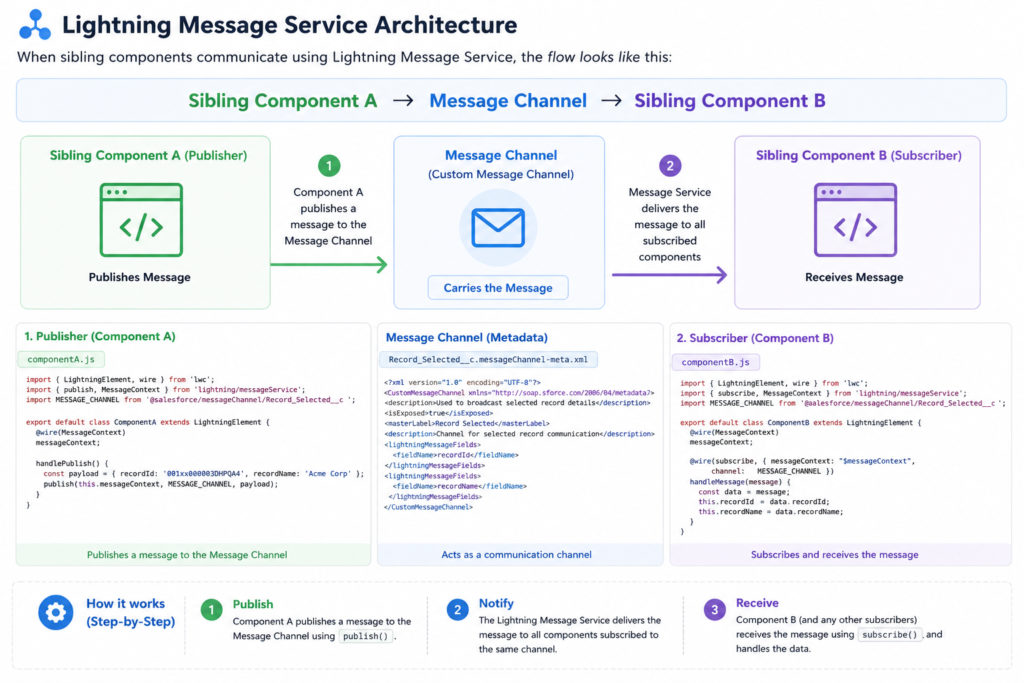
Sibling Communication
Sibling components communicate using:
- Lightning Message Service (LMS)
- PubSub (older approach)
Interviewers often ask:
“Which is preferred?”
Correct Answer:
Lightning Message Service.
Lightning Message Service Architecture
Image:
Sibling Component A → Message Channel → Sibling Component B
4. Lifecycle Hooks in LWC
This is one of the most important concepts.
Interviewers frequently ask:
- What are lifecycle hooks?
- Difference between connectedCallback and renderedCallback?
- When should we call Apex?
- Which hook executes multiple times?
What are Lifecycle Hooks?
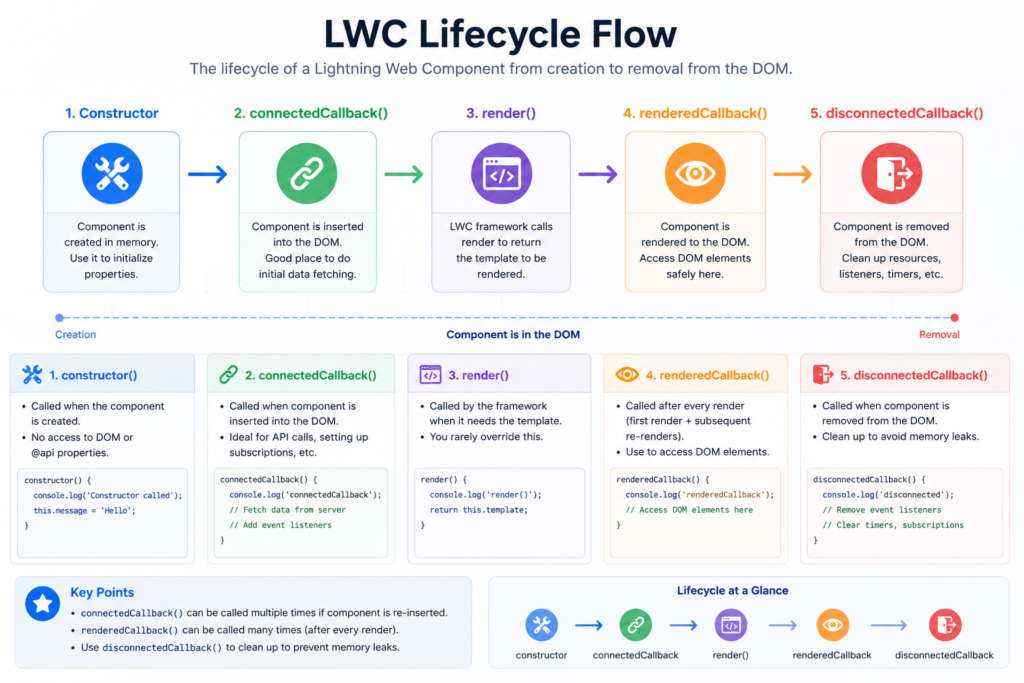
Lifecycle hooks are special JavaScript methods that execute automatically during component creation and destruction.
LWC Lifecycle Flow
Image:
Constructor → connectedCallback → render() → renderedCallback → disconnectedCallback
1. constructor()
This is the first method executed.
Used for:
- Initializing variables
- Basic setup
Example
constructor() {
    super();
    console.log('Constructor Called');
}
Important Interview Point
Never access DOM elements in constructor.
Because component is not rendered yet.
2. connectedCallback()
Called when component is inserted into DOM.
Best Uses
- Call Apex
- Initialize data
- Subscribe to LMS
- Setup listeners
Example
connectedCallback() {
    console.log('Component Inserted into DOM');
}
Interview Tip
Most developers call APIs inside:
connectedCallback()
3. renderedCallback()
Called after component rendering completes.
Important Concept
This hook can execute multiple times.
Reason:
Whenever reactive property changes, component rerenders.
Example
renderedCallback() {
    console.log('Component Rendered');
}
Common Interview Mistake
Candidates often create infinite loops inside renderedCallback.
Example:
renderedCallback() {
    this.name = 'Salesforce';
}
This causes continuous rerendering.
Correct Approach
Use boolean flag.
isRendered = false;

renderedCallback() {
    if(this.isRendered) {
        return;
    }

    this.isRendered = true;

    console.log('Executed Once');
}
4. disconnectedCallback()
Called when component is removed from DOM.
Best Uses
- Cleanup code
- Remove listeners
- Unsubscribe LMS
- Clear intervals
Example
disconnectedCallback() {
    console.log('Component Removed');
}
Lifecycle Hooks Comparison Table
| Hook | Purpose |
|---|---|
| constructor | Initialize component |
| connectedCallback | Component added to DOM |
| renderedCallback | Component rendered |
| disconnectedCallback | Component removed |
Frequently Asked LWC Interview Questions
1. Why is LWC faster than Aura?
Because LWC:
- Uses native browser APIs
- Lightweight framework
- Better rendering engine
- Less abstraction
2. Difference between @track and @api?
| Decorator | Purpose |
|---|---|
| @api | Public property |
| @track | Reactive private property |
3. Can we call Apex in constructor?
Technically possible but not recommended.
Use:
connectedCallback()
4. Which lifecycle hook executes multiple times?
renderedCallback()
5. Which communication method is best for unrelated components?
Lightning Message Service.
Real Interview Scenario Questions
Scenario 1
You need to display Account data automatically whenever search value changes.
Best Solution
Use:
@wire
Because it supports reactive data fetching.
Scenario 2
User clicks button and records should save.
Best Solution
Use:
Imperative Apex
Because DML operations are needed.
Scenario 3
You need simple record edit form.
Best Solution
Use:
Lightning Data Service
Scenario 4
Child component needs to notify parent after save.
Best Solution
Use:
Custom Events
Common Mistakes Candidates Make in Interviews
1. Confusing @wire with Imperative Apex
2. Forgetting cacheable=true
3. Calling DML using @wire
4. Infinite loops in renderedCallback
5. Using Apex when LDS is enough
Final Interview Preparation Tips
Focus on Practical Understanding
Interviewers prefer:
- Real scenarios
- Best practices
- Performance optimization
- Security understanding
more than memorized definitions.
Best Way to Answer LWC Interview Questions
Always explain:
- What it is
- Why it is used
- When to use it
- Real-world example
- Best practices
- Limitations
Conclusion
LWC interview questions are heavily focused on:
- Real implementation
- Component communication
- Data handling
- Performance optimization
- Lifecycle understanding
The most important concepts every Salesforce developer should master are:
@wire- Imperative Apex
- LDS
- Parent-child communication
- Lifecycle hooks
- Lightning Message Service
If you understand these concepts deeply with practical examples, you can confidently answer most Salesforce LWC interview questions.
Recommended Practice Exercises
Build these mini projects:
- Account Search using @wire
- Contact Save using Imperative Apex
- Record Form using LDS
- Parent-child communication demo
- LMS communication demo
- Lifecycle hooks logger component
These projects will improve both:
- Interview confidence
- Real project skills
Best of Luck
Trusted by 2000+ learners to crack interviews at TCS, Infosys, Wipro, EY, and more.
Want more Real Salesforce Interview Q&As?
- For Beginners (1–4 Yrs Experience) → https://trailheadtitanshub.com/100-real-salesforce-scenario-based-interview-questions-2025-edition-for-1-4-years-experience/
- For Intermediate Developers (4–8 Yrs Experience) → https://trailheadtitanshub.com/100-real-time-salesforce-scenario-based-interview-questions-2025-edition-for-4-8-years-experience/
For All Job Seekers – 500+ Questions from Top Tech Companies → https://trailheadtitanshub.com/500-real-interview-questions-answers-from-top-tech-companies-ey-infosys-tcs-dell-salesforce-more/
- Student Journey – 34 Days to Crack Salesforce Interview → https://trailheadtitanshub.com/crack-the-interview-real-questions-real-struggles-my-students-34-day-journey/
Mega Interview Packs:
- 600 Real Q&A (Recruiter Calls) → https://trailheadtitanshub.com/salesforce-interview-mega-pack-600-real-questions-from-recruiter-calls-with-my-best-performing-answers/
- 100 Real-Time Scenarios (Admin + Apex + LWC + Integration) → 100 Real-Time Salesforce Interview Questions & Scenarios (2026 Edition) – Admin, Apex, SOQL, LWC, VF, Integration – Trailhead Titans Hub
Career Boosters:
- Salesforce Project (Sales Cloud) → https://trailheadtitanshub.com/salesforce-project-sales-cloud/
- Resume Templates (ATS-Friendly) → https://trailheadtitanshub.com/salesforce-resume-templates-that-work-beat-ats-impress-recruiters/
Visit us On→ www.trailheadtitanshub.com