

Introduction
One of the most frequently asked Salesforce Developer interview questions is:
“What is the difference between
with sharing,without sharing, andinherited sharingin Apex?”
Surprisingly, many candidates answer this incorrectly.
Some developers believe these keywords control CRUD/FLS permissions. Others think they only matter for Experience Cloud users.
The reality is different.
Understanding these keywords is critical because they directly impact data security, record visibility, and application behavior.
A wrong choice can expose sensitive records to users who should never see them.
In this article, we’ll break down:
- What each keyword does
- How Salesforce executes sharing rules
- Practical real-world use cases
- Interview questions and answers
- Best practices followed by Salesforce architects
First Understand: What Does “Sharing” Mean?
Before discussing the keywords, let’s understand the concept.
Salesforce security consists of multiple layers:
- Organization-Wide Defaults (OWD)
- Role Hierarchy
- Sharing Rules
- Manual Sharing
- Teams
- Territories
- Apex Managed Sharing
These mechanisms determine:
Which records a user can see.
For example:
User A
Can see:
- Account A
- Account B
User B
Can see:
- Account A only
If User B runs Apex code, should the code return only Account A or both records?
That depends on the sharing keyword used.
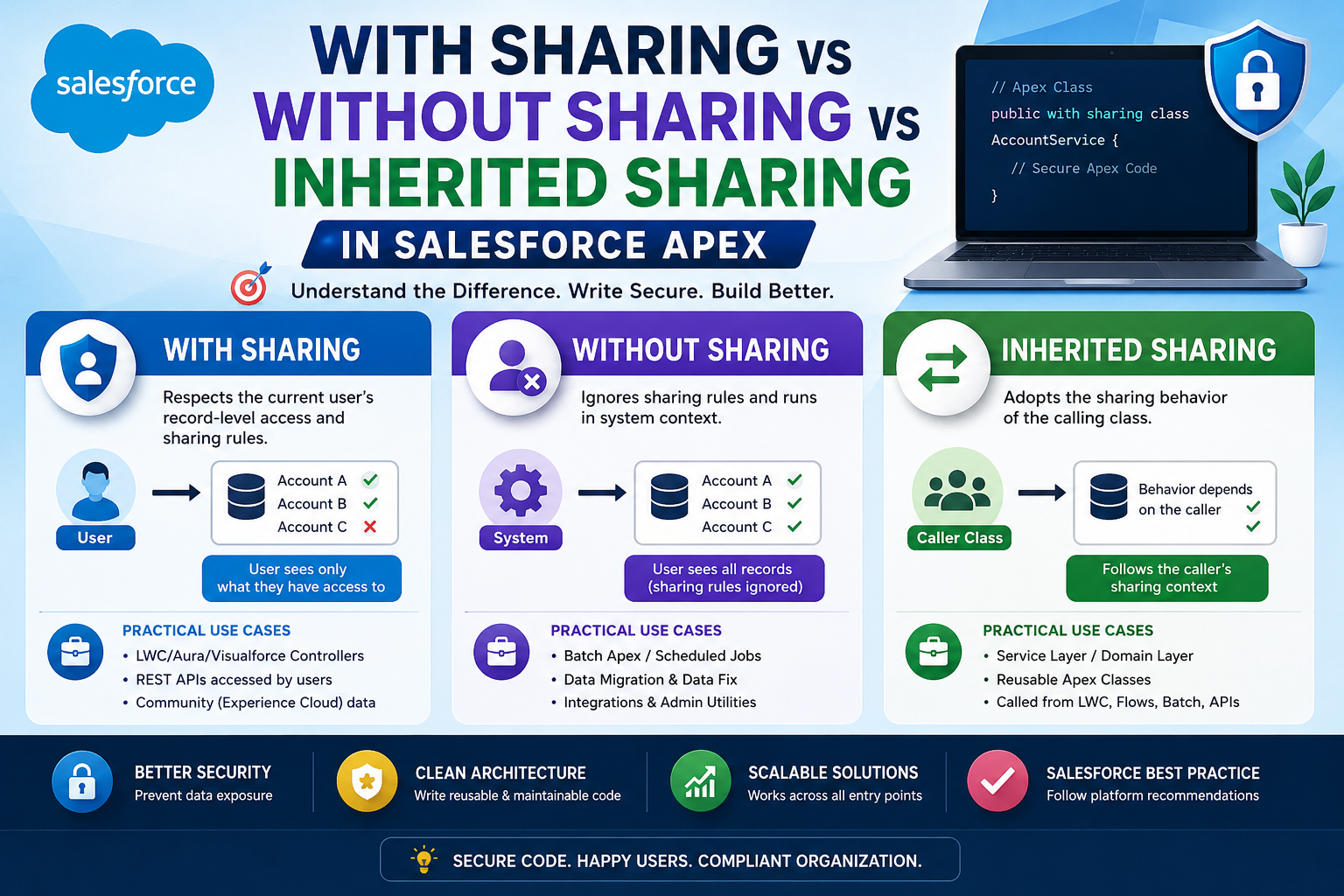
What is with sharing?
with sharing tells Salesforce:
“Respect the current user’s record-level access.”
Syntax
public with sharing class AccountService {

    public static List<Account> getAccounts() {
        return [SELECT Id, Name FROM Account];
    }

}
How It Works
Suppose:
User A
Can access:
- Account A
- Account B
- Account C
User B
Can access:
- Account A
When both users execute:
SELECT Id, Name FROM AccountResults:
User A
Returns:
Account A
Account B
Account C
User B
Returns:
Account ABecause Salesforce enforces sharing rules.
Real-World Use Case
Imagine a sales application.
Sales Representatives should only view their own Accounts.
A Lightning Web Component displays Accounts.
public with sharing class AccountController {
    @AuraEnabled
    public static List<Account> getAccounts() {
        return [
            SELECT Id, Name
            FROM Account
        ];
    }
}
Now each user sees only records they are allowed to access.
This is the most common and safest approach.
Advantages
Security First
Prevents accidental exposure of records.
User-Friendly
Users only see what Salesforce security allows.
Recommended by Salesforce
Most UI controllers should use:
with sharingInterview Answer
Q: When should we use with sharing?
Answer:
Use with sharing when Apex should respect the current user’s record-level permissions and sharing rules. It is commonly used in controllers, services, and APIs accessed directly by users.
What is without sharing?
without sharing tells Salesforce:
“Ignore sharing rules and run in system context.”
Syntax
public without sharing class AccountService {

    public static List<Account> getAccounts() {
        return [
            SELECT Id, Name
            FROM Account
        ];
    }

}
How It Works
Again:
User A
Can see:
- Account A
- Account B
- Account C
User B
Can see:
- Account A
Using:
without sharingBoth users receive:
Account A
Account B
Account C
Because sharing rules are ignored.
Important Interview Point
Many candidates think:
without sharingmeans Admin permissions.
That is incorrect.
It only bypasses record-level sharing.
It does NOT automatically bypass:
- Object Permissions (CRUD)
- Field-Level Security (FLS)
Modern Salesforce development should enforce CRUD/FLS separately.
Real-World Use Case #1: Batch Jobs
Imagine a nightly batch job:
public without sharing class AccountBatch
implements Database.Batchable<SObject>
{
}
The job must process all Accounts.
Not just records visible to the user who started it.
Using:
without sharingensures every record can be processed.
Real-World Use Case #2: Data Migration
A migration utility must update all records.
Restricting visibility could leave data partially migrated.
Hence:
without sharingis often appropriate.
Real-World Use Case #3: Integration User
An external ERP system syncs Accounts.
The integration should access all required records regardless of user visibility.
Apex integration services frequently use:
without sharingcombined with proper validation.
Risks
Security Exposure
Improper use can expose confidential data.
Example:
public without sharing class AccountControllerconnected directly to an LWC.
Now users may see records they should never access.
This is a major security issue.
Interview Answer
Q: When should we use without sharing?
Answer:
Use without sharing only when business requirements demand access to records beyond the user’s sharing permissions, such as batch processing, integrations, data migration utilities, or administrative operations.
What is inherited sharing?
Introduced to solve ambiguity.
Syntax
public inherited sharing class AccountService {

}
Why Salesforce Introduced It
Consider:
public class AccountService {

}
No sharing keyword specified.
What happens?
Many developers assume:
with sharingBut that’s wrong.
The behavior depends on the caller.
This creates uncertainty and security risks.
Salesforce introduced:
inherited sharingto make the intention explicit.
How inherited sharing Works
It inherits sharing behavior from the caller.
Scenario 1
Caller:
public with sharing class AccountController
{
}
Calls:
public inherited sharing class AccountService
{
}
Result:
with sharingbehavior is applied.
Scenario 2
Caller:
public without sharing class AdminService
{
}
Calls:
public inherited sharing class AccountService
{
}
Result:
without sharingbehavior is applied.
Visual Flow
Caller Class
      |
      |
      v
Inherited Sharing Class
      |
      |
      v
Uses Caller's Sharing Context
Real-World Use Case
Imagine a reusable service layer.
public inherited sharing class OpportunityService
{
}
Used by:
LWC Controller
with sharingand
Batch Process
without sharingInstead of creating multiple versions, the service automatically adapts to the caller.
This promotes cleaner architecture.
Why Architects Prefer inherited sharing
Large enterprises often have:
Controller Layer
     ↓
Service Layer
     ↓
Domain Layer
     ↓
Repository Layer
The same service may be called from:
- LWC
- Flow
- REST API
- Batch Apex
- Queueable Apex
Using:
inherited sharingmakes the service reusable while respecting the caller’s security context.
Comparison Table
| Feature | with sharing | without sharing | inherited sharing |
|---|---|---|---|
| Respects Sharing Rules | ✅ Yes | ❌ No | Depends on Caller |
| Runs in System Context | ❌ No | ✅ Yes | Depends |
| Secure for UI Controllers | ✅ Yes | ❌ No | ✅ Usually |
| Suitable for Batch Jobs | ❌ Usually No | ✅ Yes | Depends |
| Suitable for Service Layer | ⚠️ Sometimes | ⚠️ Sometimes | ✅ Best Choice |
| Follows Caller Context | ❌ No | ❌ No | ✅ Yes |
Common Interview Trap
Question
What happens if no sharing keyword is specified?
Example:
public class AccountService
{
}
Answer
The class runs using the sharing context of the caller.
However, the behavior can be unclear and difficult to maintain.
Salesforce recommends using:
inherited sharingto explicitly define intent.
Best Practice Recommended by Salesforce Architects
UI Controllers
with sharingExamples:
- LWC Controllers
- Aura Controllers
- Visualforce Controllers
- REST APIs accessed by users
Batch Jobs & Admin Utilities
without sharingExamples:
- Data Cleanup
- Integrations
- Scheduled Jobs
- Batch Apex
Service Layer
inherited sharingExamples:
- Domain Services
- Business Logic Classes
- Reusable Utility Services
Interview Summary (One-Line Answers)
with sharing
Respects the current user’s record access and sharing rules.
without sharing
Ignores record-level sharing and executes in system context.
inherited sharing
Adopts the sharing behavior of the calling class.
Final Thoughts
The difference between with sharing, without sharing, and inherited sharing is not just an interview topic—it’s one of the most important security concepts in Apex development.
A simple keyword can determine whether users see only their own records or gain visibility into confidential company data.
A practical rule many Salesforce architects follow is:
UI Layer          → with sharing
Service Layer     → inherited sharing
Batch/Integration → without sharing
If you remember this pattern and understand the reasoning behind it, you’ll not only answer interview questions confidently but also design secure, scalable Salesforce applications that follow industry best practices.
Best of Luck
Trusted by 3000+ learners to crack interviews at TCS, Infosys, Wipro, EY, and more.
Want more Real Salesforce Interview Q&As?
- For Beginners (1–4 Yrs Experience) → https://trailheadtitanshub.com/100-real-salesforce-scenario-based-interview-questions-2025-edition-for-1-4-years-experience/
- For Intermediate Developers (4–8 Yrs Experience) → https://trailheadtitanshub.com/100-real-time-salesforce-scenario-based-interview-questions-2025-edition-for-4-8-years-experience/
For All Job Seekers – 500+ Questions from Top Tech Companies → https://trailheadtitanshub.com/500-real-interview-questions-answers-from-top-tech-companies-ey-infosys-tcs-dell-salesforce-more/
- Student Journey – 34 Days to Crack Salesforce Interview → https://trailheadtitanshub.com/crack-the-interview-real-questions-real-struggles-my-students-34-day-journey/
Mega Interview Packs:
- 600 Real Q&A (Recruiter Calls) → https://trailheadtitanshub.com/salesforce-interview-mega-pack-600-real-questions-from-recruiter-calls-with-my-best-performing-answers/
- 100 Real-Time Scenarios (Admin + Apex + LWC + Integration) → 100 Real-Time Salesforce Interview Questions & Scenarios (2026 Edition) – Admin, Apex, SOQL, LWC, VF, Integration – Trailhead Titans Hub
Career Boosters:
- Salesforce Project (Sales Cloud) → https://trailheadtitanshub.com/salesforce-project-sales-cloud/
- Resume Templates (ATS-Friendly) → https://trailheadtitanshub.com/salesforce-resume-templates-that-work-beat-ats-impress-recruiters/