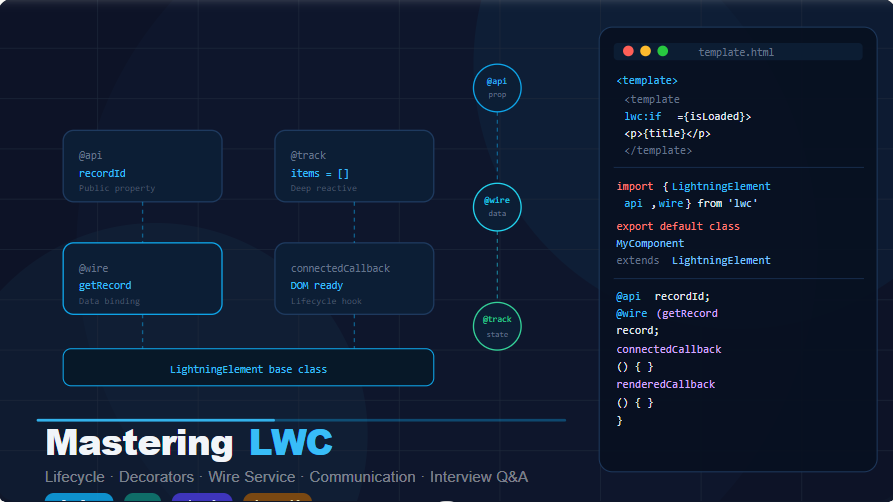
Struggling with LWC? This guide simplifies everything—from basics to advanced concepts—with real-world examples, helping you master Lightning Web Components and confidently crack Salesforce interviews.
Lightning Web Components — Complete Guide
Full component anatomy, lifecycle hooks, decorators, communication patterns, wire service, best practices, and scenario-based interview questions with complete copy-ready code.
Lightning Web Components (LWC) is Salesforce’s modern UI framework built on web standards — Custom Elements, Shadow DOM, and ES Modules. Every LWC component is a folder containing an HTML template, a JavaScript controller, and optionally a CSS file and metadata XML.
<!-- myComponent.html -->
<template>

    <!-- Conditional rendering -->
    <template lwc:if={isLoaded}>
        <p>Hello, {greeting}</p>
    </template>
    <template lwc:else>
        <p>Loading...</p>
    </template>

    <!-- Iteration -->
    <template for:each={items} for:item="item">
        <li key={item.id}>{item.name}</li>
    </template>

    <!-- Event binding -->
    <lightning-button
        label="Save"
        onclick={handleSave}
    ></lightning-button>

    <!-- Child component -->
    <c-child-component
        record-id={recordId}
        onchildevent={handleChildEvent}
    ></c-child-component>

</template>
import { LightningElement, api, track, wire } from 'lwc';
import { ShowToastEvent } from 'lightning/platformShowToastEvent';
import getAccounts from '@salesforce/apex/AccountController.getAccounts';

export default class MyComponent extends LightningElement {

    // Public property — parent can pass value in
    @api recordId;
    @api greeting = 'World';

    // Reactive private property — re-renders on change
    @track items = [];
    isLoaded = false;
    error;

    // Wire — auto-calls Apex when recordId changes
    @wire(getAccounts, { recordId: '$recordId' })
    wiredAccounts({ error, data }) {
        if (data) {
            this.items = data;
            this.isLoaded = true;
        } else if (error) {
            this.error = error;
        }
    }

    // Lifecycle hook
    connectedCallback() {
        console.log('Component mounted to DOM');
    }

    // Event handler
    handleSave() {
        this.dispatchEvent(new ShowToastEvent({
            title: 'Success',
            message: 'Record saved!',
            variant: 'success'
        }));
    }

    // Getter — computed property
    get hasItems() {
        return this.items && this.items.length > 0;
    }
}
<?xml version="1.0" encoding="UTF-8"?>
<LightningComponentBundle xmlns="http://soap.sforce.com/2006/04/metadata">
    <apiVersion>59.0</apiVersion>
    <isExposed>true</isExposed>
    <targets>
        <target>lightning__AppPage</target>
        <target>lightning__RecordPage</target>
        <target>lightning__HomePage</target>
    </targets>
    <targetConfigs>
        <targetConfig targets="lightning__RecordPage">
            <property name="greeting" type="String" label="Greeting Text"/>
        </targetConfig>
    </targetConfigs>
</LightningComponentBundle>
Lifecycle hooks let you run code at specific points in a component’s life — when it’s created, inserted into the DOM, rendered, or removed. Understanding the exact order is a critical interview topic.
import { LightningElement, api } from 'lwc';

export default class LifecycleDemo extends LightningElement {

    /**
     * constructor()
     * - First hook called when component instance is created
     * - Called BEFORE the component is inserted into DOM
     * - Never access this.template here (DOM not ready)
     * - Always call super() first
     * - Use: initialize primitive properties
     */
    constructor() {
        super();
        // OK: set primitive defaults
        this.title = 'Initial value';
        // NOT OK: this.template.querySelector(...) — DOM not ready yet
    }

    /**
     * connectedCallback()
     * - Called when component is INSERTED into the DOM
     * - this.template is accessible
     * - Use: fetch data, add event listeners, subscribe to message channels
     * - Fires for every re-insertion (navigation, conditional rendering)
     */
    connectedCallback() {
        this.loadInitialData();
        window.addEventListener('resize', this.handleResize.bind(this));
    }

    /**
     * render()
     * - Called to determine which template to render
     * - Must return a template reference (imported HTML file)
     * - Use: conditional template switching (e.g. edit vs read mode)
     * - RARE — most components don't need this hook
     */
    render() {
        return this.isEditMode ? editTemplate : viewTemplate;
    }

    /**
     * renderedCallback()
     * - Called AFTER every render (first render + re-renders)
     * - DOM is fully painted — safe to use this.template.querySelector()
     * - Use: third-party JS lib init, DOM measurements, canvas operations
     * - IMPORTANT: guard with a flag to avoid infinite loops
     */
    renderedCallback() {
        if (this.hasRendered) return; // prevent re-run on every re-render
        this.hasRendered = true;
        // Safe to access DOM now
        const input = this.template.querySelector('input');
        if (input) input.focus();
    }

    /**
     * disconnectedCallback()
     * - Called when component is REMOVED from the DOM
     * - Use: clean up event listeners, unsubscribe from channels
     * - Prevents memory leaks
     */
    disconnectedCallback() {
        window.removeEventListener('resize', this.handleResize);
        // unsubscribe from MessageChannel if subscribed
    }

    /**
     * errorCallback(error, stack)
     * - Called when a child component throws an error
     * - ONLY works on PARENT components — acts as an error boundary
     * - Use: graceful error UI, logging
     */
    errorCallback(error, stack) {
        console.error('Child error:', error);
        console.error('Stack:', stack);
        this.errorMessage = error.message;
    }
}
renderedCallback() fires on EVERY render, not just the first one. Always guard with a boolean flag like hasRendered to prevent infinite re-render loops caused by setting reactive properties inside it.Decorators are the most commonly tested LWC topic in interviews. Understanding the exact difference between them — especially @api vs @track — is essential.
import { LightningElement, api } from 'lwc';

export default class ChildComponent extends LightningElement {

    // Simple @api property — parent passes value via HTML attribute
    @api title = 'Default Title';
    @api recordId;
    @api isReadOnly = false;

    // @api with getter/setter — intercept changes from parent
    _items = [];
    @api
    get items() {
        return this._items;
    }
    set items(value) {
        // Transform data as it arrives from parent
        this._items = value ? [...value].sort((a, b) => a.name.localeCompare(b.name)) : [];
    }

    // @api method — parent can call this directly via template ref
    @api
    resetForm() {
        this.template.querySelectorAll('lightning-input')
            .forEach(input => input.reset());
    }

    // WRONG: Never mutate @api props inside the child — read-only from child
    // this.recordId = 'newId'; // ← this throws an error in LWC
}

// Parent HTML usage:
<c-child-component
    title="My Title"
    record-id={currentRecordId}
    items={accountList}
></c-child-component>

// Parent JS — calling @api method via template ref:
// this.template.querySelector('c-child-component').resetForm();
import { LightningElement, track } from 'lwc';

export default class TrackDemo extends LightningElement {

    // Since API v39+, primitive reassignment is reactive WITHOUT @track
    count = 0;           // reactive — this.count++ triggers re-render
    name = '';            // reactive — this.name = 'x' triggers re-render
    isOpen = false;       // reactive — this.isOpen = true triggers re-render

    // Object REASSIGNMENT is reactive WITHOUT @track
    user = { name: 'Alice', age: 30 };
    replaceUser() {
        // Reassigning the whole object — reactive, no @track needed
        this.user = { name: 'Bob', age: 25 };
    }

    // Deep MUTATION of nested object/array — needs @track
    @track config = {
        filters: { status: 'Active', type: 'Customer' },
        pagination: { page: 1, pageSize: 10 }
    };

    updateFilter() {
        // Mutating a nested property — ONLY reactive because of @track
        this.config.filters.status = 'Inactive'; // re-renders
        this.config.pagination.page = 2;         // re-renders
    }

    // @track on arrays — needed for push/splice/sort mutations
    @track rows = [];
    addRow() {
        // .push() mutates in place — needs @track to be reactive
        this.rows.push({ id: Date.now(), value: 'New' });
    }
}
The @wire decorator is the primary way LWC components talk to Salesforce data. Wire adapters auto-refresh when reactive parameters change. For imperative DML operations, use Apex methods directly with async/await.
public with sharing class AccountController {

    /**
     * @AuraEnabled(cacheable=true) — required for @wire
     * cacheable=true: result is cached, read-only SOQL only
     * cacheable=false: for DML operations, used imperatively
     */
    @AuraEnabled(cacheable=true)
    public static List<Account> getAccounts(String searchKey) {
        String key = '%' + searchKey + '%';
        return [
            SELECT Id, Name, Industry, AnnualRevenue, Phone
            FROM Account
            WHERE Name LIKE :key
            ORDER BY Name
            LIMIT 50
        ];
    }

    // NOT cacheable — used imperatively for DML
    @AuraEnabled
    public static Account saveAccount(Account accountRecord) {
        try {
            upsert accountRecord;
            return accountRecord;
        } catch (Exception e) {
            throw new AuraHandledException(e.getMessage());
        }
    }

    @AuraEnabled(cacheable=true)
    public static Account getAccountById(Id recordId) {
        return [
            SELECT Id, Name, Industry, Phone, BillingCity
            FROM Account
            WHERE Id = :recordId
            LIMIT 1
        ];
    }
}
import { LightningElement, api, wire, track } from 'lwc';
import { ShowToastEvent } from 'lightning/platformShowToastEvent';
import { refreshApex } from '@salesforce/apex';
import getAccounts from '@salesforce/apex/AccountController.getAccounts';
import getAccountById from '@salesforce/apex/AccountController.getAccountById';
import saveAccount from '@salesforce/apex/AccountController.saveAccount';

export default class AccountList extends LightningElement {

    @api recordId;
    searchKey = '';
    isLoading = false;
    wiredAccountsResult; // store wire result for refreshApex

    // ─── PATTERN 1: @wire with function handler ──────────────────
    // Best when you need to handle data AND error separately
    accounts = [];
    error;

    @wire(getAccounts, { searchKey: '$searchKey' })
    wiredAccounts(result) {
        this.wiredAccountsResult = result; // store for refreshApex
        const { data, error } = result;
        if (data) {
            this.accounts = data;
            this.error = undefined;
        } else if (error) {
            this.error = error;
            this.accounts = [];
        }
    }

    // ─── PATTERN 2: @wire directly to property ───────────────────
    // Simpler — good when you just display data
    @wire(getAccountById, { recordId: '$recordId' })
    account;
    // Template: {account.data.Name}, {account.error}

    // ─── PATTERN 3: Imperative Apex call (async/await) ───────────
    // Use for: DML, user-triggered actions, conditional calling
    async handleSave(event) {
        const accountToSave = {
            Id: this.recordId,
            Name: event.detail.name,
            Phone: event.detail.phone
        };

        this.isLoading = true;
        try {
            await saveAccount({ accountRecord: accountToSave });
            this.dispatchEvent(new ShowToastEvent({
                title: 'Success', message: 'Account saved', variant: 'success'
            }));
            // Refresh @wire cache after DML
            await refreshApex(this.wiredAccountsResult);
        } catch (error) {
            this.dispatchEvent(new ShowToastEvent({
                title: 'Error',
                message: error.body?.message || 'Unknown error',
                variant: 'error'
            }));
        } finally {
            this.isLoading = false;
        }
    }

    handleSearchChange(event) {
        this.searchKey = event.target.value; // $ prefix makes @wire re-fire
    }
}
cacheable=true only for read-only SOQL queries — this enables @wire. For any Apex method that does DML (insert/update/delete), use cacheable=false and call it imperatively. Always wrap imperative calls in try/catch/finally.LWC has four communication patterns depending on the relationship between components. Choosing the right pattern is a top senior interview question.
| Pattern | Direction | Relationship | Mechanism |
|---|---|---|---|
| @api property | Parent → Child | Direct parent-child | HTML attribute binding |
| Custom Event | Child → Parent | Direct parent-child | dispatchEvent + event listener |
| LMS | Any → Any | Unrelated components | Lightning Message Service |
| PubSub | Any → Any | Same page, unrelated | Custom pubsub utility (legacy) |
// ─── childComponent.js ──────────────────────────────────────
import { LightningElement, api } from 'lwc';

export default class ChildComponent extends LightningElement {

    @api label = 'Submit';

    handleClick() {
        // Create custom event with detail payload
        const evt = new CustomEvent('recordselect', {
            detail: {
                recordId: '001xx000003GYkl',
                recordName: 'Acme Corp'
            },
            bubbles: true,    // event bubbles up through DOM tree
            composed: false   // false = stays inside shadow boundary
        });
        this.dispatchEvent(evt);
    }
}

// childComponent.html
<template>
    <lightning-button label={label} onclick={handleClick}></lightning-button>
</template>

// ─── parentComponent.js ──────────────────────────────────────
import { LightningElement } from 'lwc';

export default class ParentComponent extends LightningElement {

    selectedRecord = {};

    handleRecordSelect(event) {
        // Access the detail payload from child event
        const { recordId, recordName } = event.detail;
        this.selectedRecord = { recordId, recordName };
        console.log('Selected:', recordName);
    }
}

// parentComponent.html
<template>
    <!-- Event name becomes: on + eventname = onrecordselect -->
    <c-child-component
        label="Pick Account"
        onrecordselect={handleRecordSelect}
    ></c-child-component>
    <p>Selected: {selectedRecord.recordName}</p>
</template>
// ─── accountMessageChannel.messageChannel-meta.xml ──────────
<?xml version="1.0" encoding="UTF-8"?>
<LightningMessageChannel xmlns="http://soap.sforce.com/2006/04/metadata">
    <masterLabel>AccountMessageChannel</masterLabel>
    <isExposed>true</isExposed>
    <fields>
        <fieldName>recordId</fieldName>
        <description>The selected record Id</description>
    </fields>
    <fields>
        <fieldName>action</fieldName>
        <description>Action type: select, update, delete</description>
    </fields>
</LightningMessageChannel>

// ─── Publisher component JS ──────────────────────────────────
import { LightningElement, wire } from 'lwc';
import { MessageContext, publish } from 'lightning/messageService';
import ACCOUNT_MC from '@salesforce/messageChannel/AccountMessageChannel__c';

export default class PublisherComponent extends LightningElement {

    @wire(MessageContext) messageContext;

    handleRowSelect(event) {
        const payload = {
            recordId: event.detail.row.Id,
            action: 'select'
        };
        publish(this.messageContext, ACCOUNT_MC, payload);
    }
}

// ─── Subscriber component JS ─────────────────────────────────
import { LightningElement, wire } from 'lwc';
import { MessageContext, subscribe, unsubscribe } from 'lightning/messageService';
import ACCOUNT_MC from '@salesforce/messageChannel/AccountMessageChannel__c';

export default class SubscriberComponent extends LightningElement {

    @wire(MessageContext) messageContext;
    subscription = null;
    selectedId;

    connectedCallback() {
        this.subscription = subscribe(
            this.messageContext,
            ACCOUNT_MC,
            (message) => this.handleMessage(message)
        );
    }

    handleMessage(message) {
        this.selectedId = message.recordId;
    }

    disconnectedCallback() {
        unsubscribe(this.subscription);
        this.subscription = null;
    }
}
These rules separate good LWC developers from great ones. Each rule maps to a real performance issue or common bug pattern.
@api items = [];

addItem() {
  // Throws: Cannot set property
  this.items.push({id:1});
}
@api items = [];

addItem() {
  // Fire event — parent handles
  this.dispatchEvent(
    new CustomEvent('additem', {
      detail: { id: 1 }
    })
  );
}
if:true and if:false are deprecated. Use lwc:if, lwc:elseif, and lwc:else directives. These also improve tree-shaking.with sharing to enforce record-level security. Never use without sharing unless you have a documented security exception and compensating controls.export default class GetterDemo extends LightningElement { accounts = []; searchKey = ''; sortField = 'Name'; // Getter — no @track needed, auto-recomputes when dependencies change get filteredAccounts() { return this.accounts .filter(a => a.Name.toLowerCase().includes(this.searchKey.toLowerCase())) .sort((a, b) => a[this.sortField].localeCompare(b[this.sortField])); } get hasAccounts() { return this.filteredAccounts.length > 0; } get accountCount() { return `Showing ${this.filteredAccounts.length} of ${this.accounts.length} accounts`; } get isButtonDisabled() { return !this.searchKey || this.isLoading; } } // Template usage — clean, no manual state management: // <template lwc:if={hasAccounts}> // <p>{accountCount}</p> // <template for:each={filteredAccounts} for:item="acc"> // <p key={acc.Id}>{acc.Name}</p> // </template> // </template>
Tap any question to expand the full answer. Covers easy to senior-level LWC topics.
Real-world LWC scenarios from Salesforce developer interviews. Each includes the full HTML, JS, Apex, and test class.
Best of Luck
Trusted by 2000+ learners to crack interviews at TCS, Infosys, Wipro, EY, and more.
Want more Real Salesforce Interview Q&As?
- For Beginners (1–4 Yrs Experience) → https://trailheadtitanshub.com/100-real-salesforce-scenario-based-interview-questions-2025-edition-for-1-4-years-experience/
- For Intermediate Developers (4–8 Yrs Experience) → https://trailheadtitanshub.com/100-real-time-salesforce-scenario-based-interview-questions-2025-edition-for-4-8-years-experience/
For All Job Seekers – 500+ Questions from Top Tech Companies → https://trailheadtitanshub.com/500-real-interview-questions-answers-from-top-tech-companies-ey-infosys-tcs-dell-salesforce-more/
- Student Journey – 34 Days to Crack Salesforce Interview → https://trailheadtitanshub.com/crack-the-interview-real-questions-real-struggles-my-students-34-day-journey/
Mega Interview Packs:
- 600 Real Q&A (Recruiter Calls) → https://trailheadtitanshub.com/salesforce-interview-mega-pack-600-real-questions-from-recruiter-calls-with-my-best-performing-answers/
- 100 Real-Time Scenarios (Admin + Apex + LWC + Integration) → 100 Real-Time Salesforce Interview Questions & Scenarios (2026 Edition) – Admin, Apex, SOQL, LWC, VF, Integration – Trailhead Titans Hub
Career Boosters:
- Salesforce Project (Sales Cloud) → https://trailheadtitanshub.com/salesforce-project-sales-cloud/
- Resume Templates (ATS-Friendly) → https://trailheadtitanshub.com/salesforce-resume-templates-that-work-beat-ats-impress-recruiters/
Visit us On→ www.trailheadtitanshub.com